
30 days free · every feature · no card

Every litre counted.
Every vendor paid right.

Give your milkman a phone instead of a notebook. He says the vendor, litres and grade, taps one big OK, and you watch every stop turn green, live, from the parlor.

Works with no signalAny Android phoneNo app store

A day with Litrio

Meet Selvi and Sri Murugan Dairy

Selvi runs a dairy parlor with three routes and a hundred small vendors. Here is one ordinary morning of hers, and everything Litrio quietly did to make it lighter.

5:30 AM · Over her morning tea

She opens her parlor in a few minutes

No sales call. No card. Selvi types her parlor's name and mobile number, confirms the code sent to her phone, and her whole parlor is ready. Every feature is free for 30 days.

She adds her routes, her vendors in the order the milkman visits them (or imports them from Excel), her collectors, and her three rates: what she pays vendors by grade, one price for local buyers, and what the dairy pays her. Then she shares one parlor code with her team.
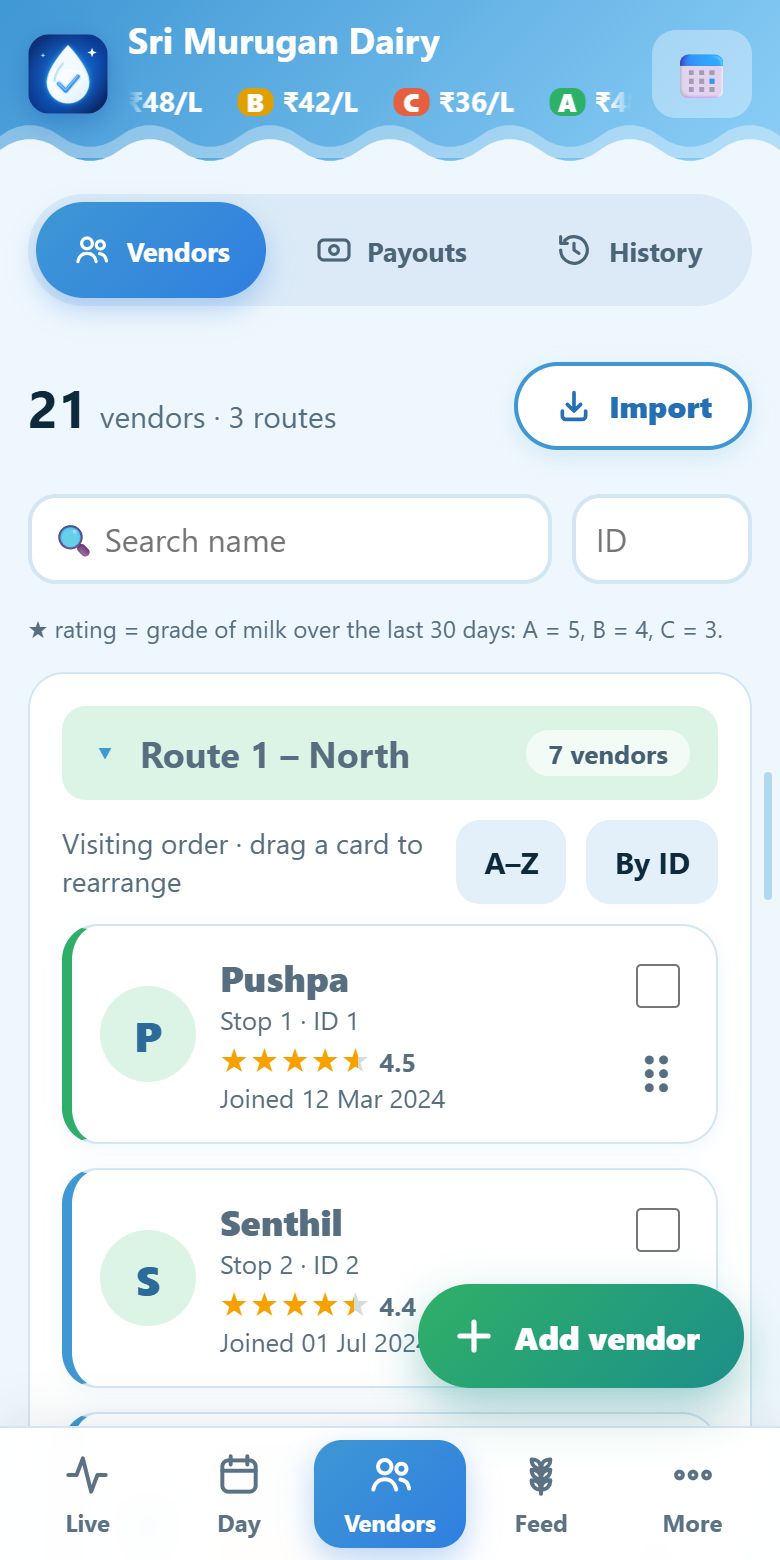
Vendor cards grouped by route, with an Import button and a round Add vendor button

Vendors as cards, grouped by route. Drag to reorder the visiting order.

6:30 AM · Ravi leaves the parlor

One tap to start, one voice to record

Ravi taps Leave parlor. At the first stop his hands are wet, so he does not type. He taps START and says “Pushpa, one litre three hundred ml, A grade.”

A big card shows exactly what will be saved: Pushpa, 1.3 L, grade A. One tap on OK, and the phone says it back and moves on to the next vendor. If it heard something wrong, he fixes it with big buttons, never a tiny keyboard.
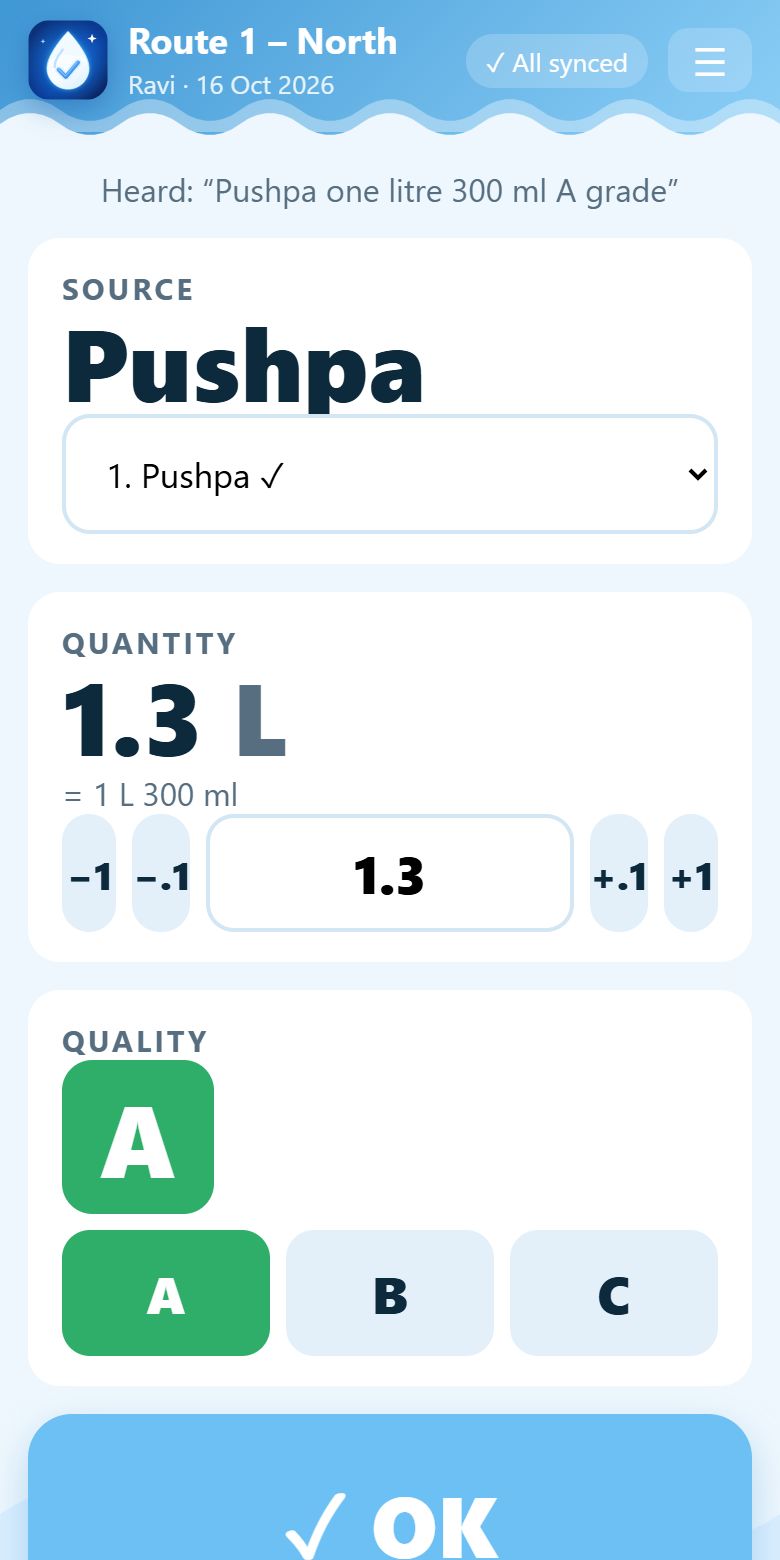
The confirm screen: vendor, quantity, grade and one big OK

The confirm card. Nothing is saved until Ravi taps OK.

7:15 AM · The hill road, no signal

Nothing is lost when the network is

The road dips through a valley and the signal vanishes. It does not matter. Every entry is saved on the phone first and uploads by itself the moment signal returns. A small badge always tells Ravi what is waiting.

Meanwhile, back at the parlor, Selvi watches her live road board: every vendor is a stop, green when collected, red when there was no milk, with the time taken between stops.
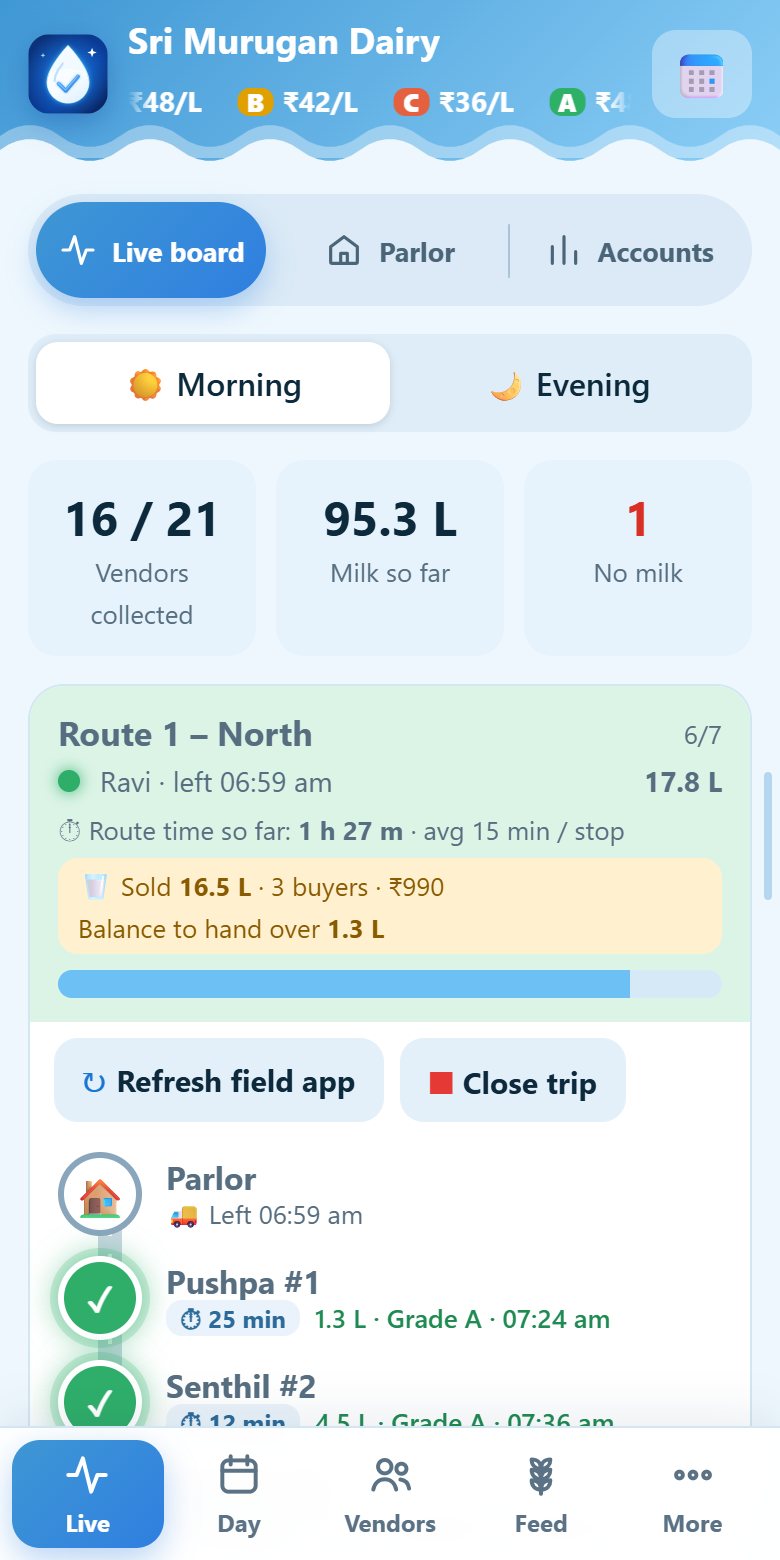
Live board: each route is a road, each vendor a stop turning green

The live board. Green = collected, red = no milk, blue pulse = next stop.

8:00 AM · A buyer at the roadside

Ravi sells milk on the road, and the tally stays right

A tea-shop owner flags him down. Ravi taps Sell milk and says “Ramesh, two point five litres.” No sign-up and no grade: buyers come on demand, and local milk has one fixed selling rate.

He can sell to as many buyers as he likes. Litrio takes every litre sold off what he collected, so he always sees the balance to hand over at the parlor.
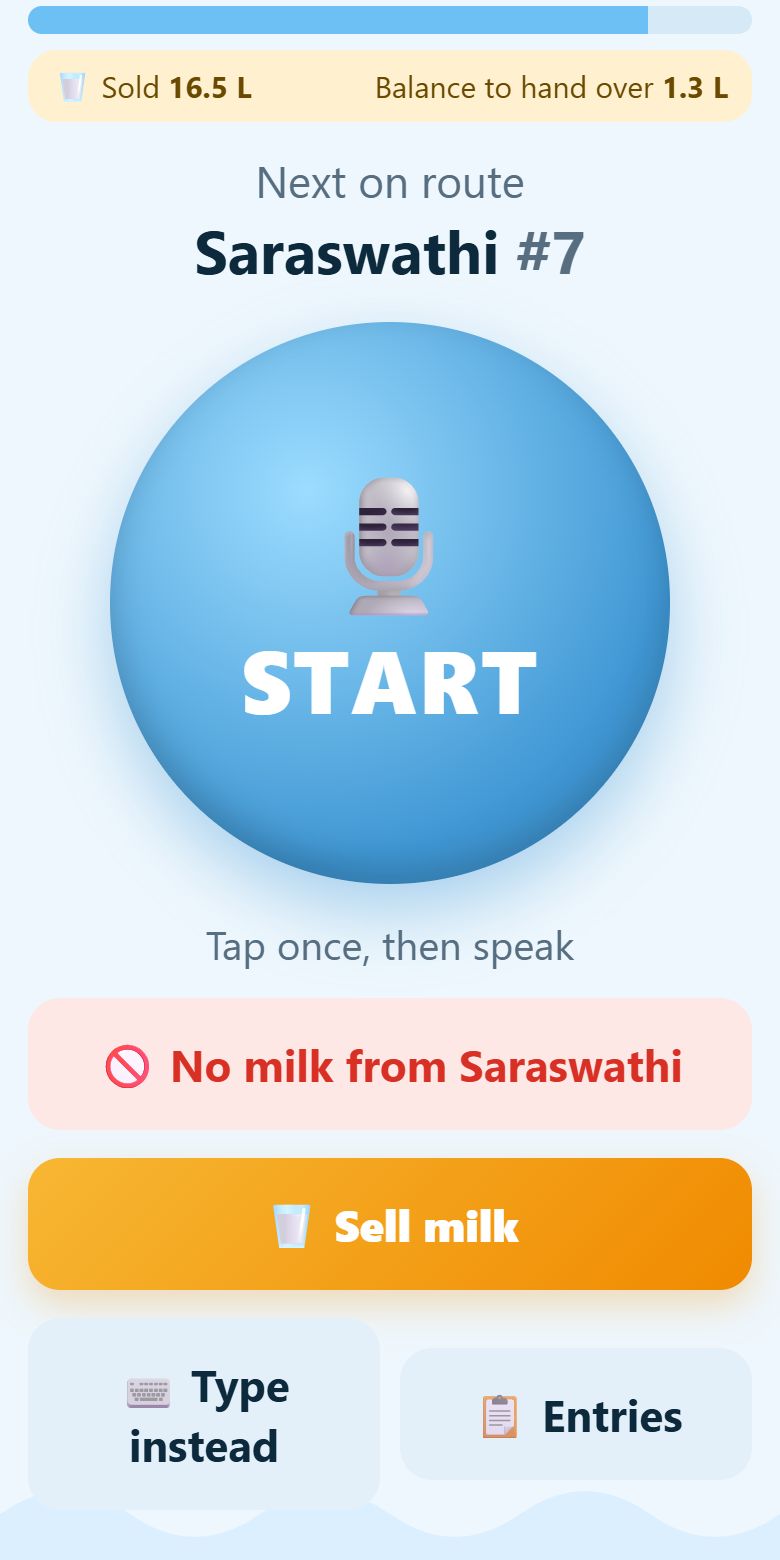
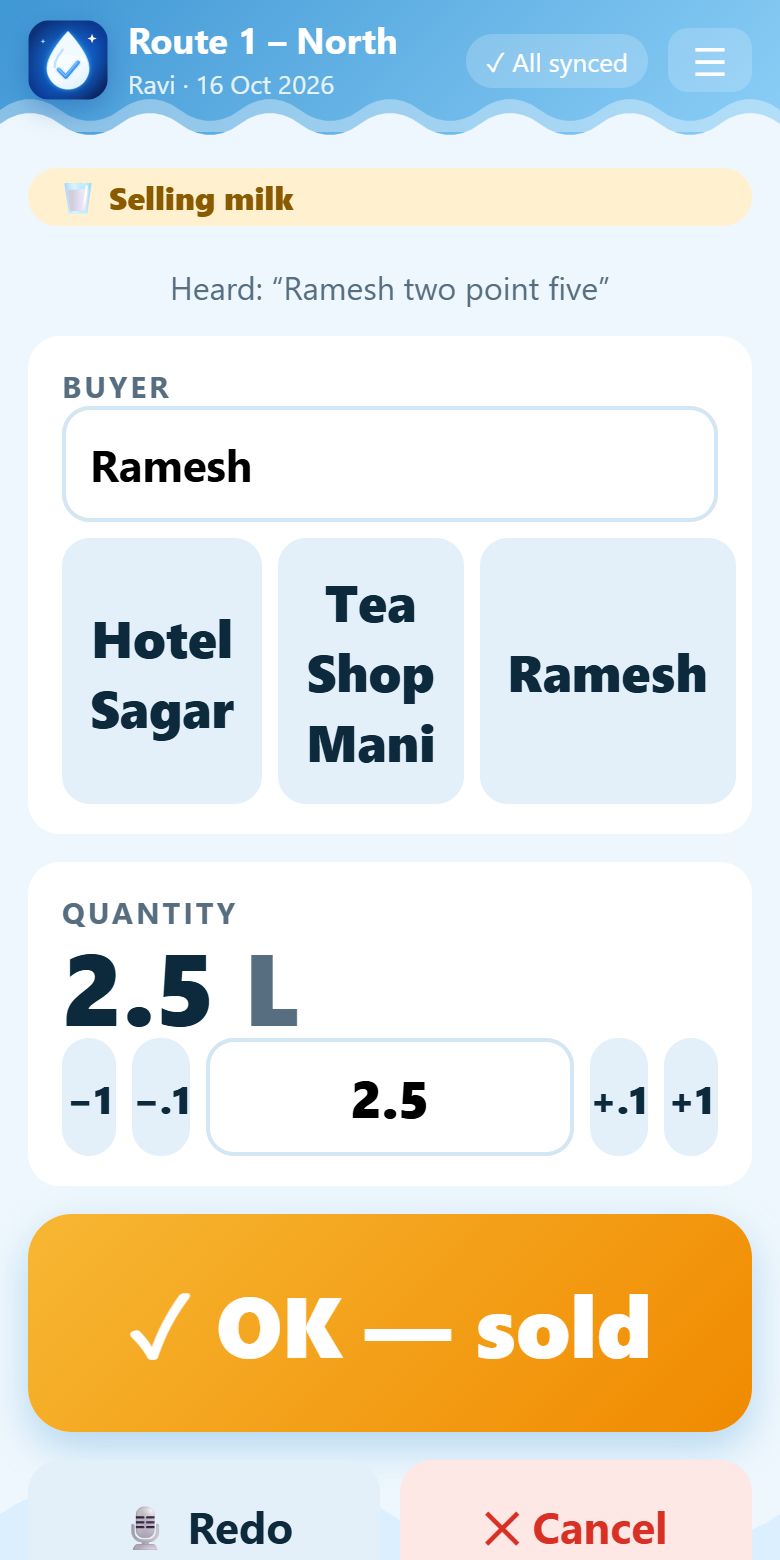
The collector home screen with a Sell milk button and the balance to hand over
Selling milk: buyer, litres and one big OK

Collecting is the default. Tap Sell milk only when you need it.

8:10 AM · Watching from the parlor

Collected and sold, in one line of the road

Every sale appears on the live road exactly where it happened. Here Ravi collected at stops 1, 2 and 3, sold 5 litres to Ramesh, collected at stop 4, sold again, and carried on. Both activities, in one line of view.

Each route also shows the litres sold, the money from them and the balance still to hand over, so Selvi never has to ask.
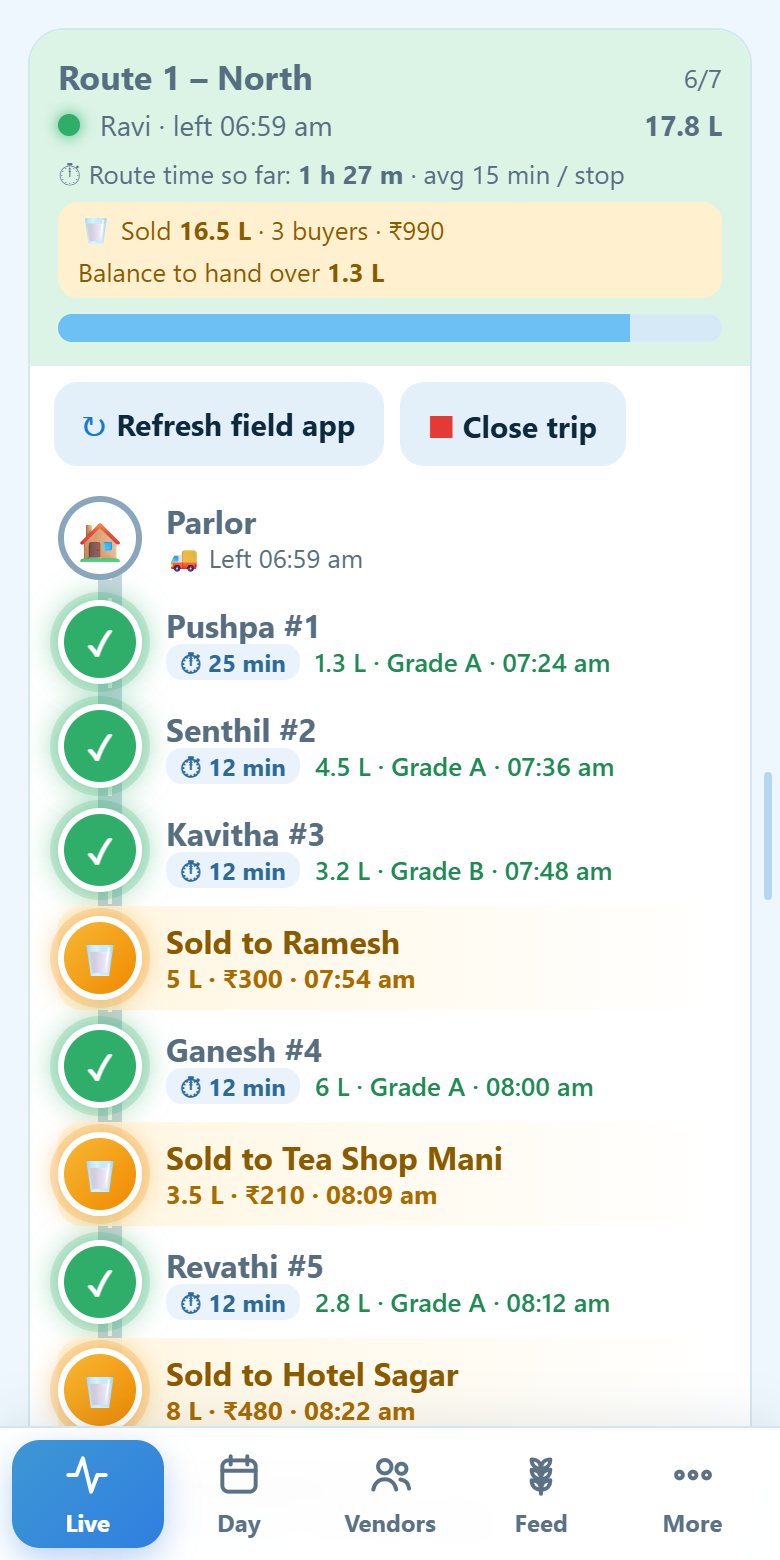
The live road: green collected stops with amber sale stops in between

Sales appear on the road where they happened, between the stops.

8:20 AM · Back at the parlor

When technology fails, the parlor stays in control

Ravi's phone freezes at stop twelve. From the live board Selvi taps Refresh field app, closes the stuck trip so it cannot disturb the evening round, and enters the missing stop herself. Nothing Ravi already collected is lost.

When he arrives he taps Arrived. Selvi sees the route time, and her Day screen shows the litres collected, the litres sold and the balance, ready to check against what the parlor received.
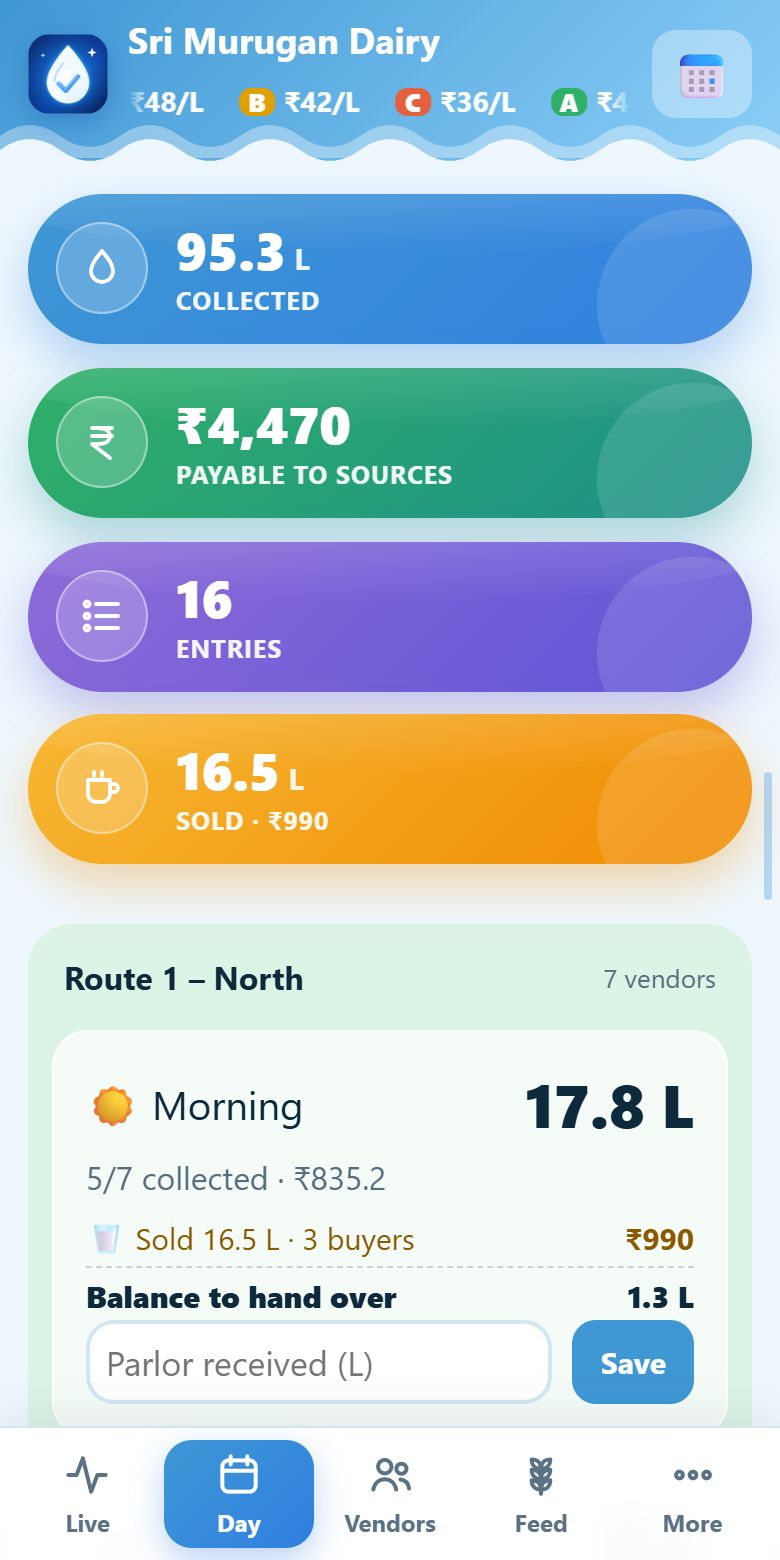
The Day screen: collected, payable, entries and milk sold, with each route

The Day screen: collected, payable, entries and milk sold, with each route's morning and evening.

8:30 AM · At the parlor counter

Meanwhile at the parlor, the counter is open too

While Ravi is on the road, vendors walk in with milk. Selvi taps Receive milk and finds the vendor by name or ID number. A vendor nobody added yet? She taps New vendor, types a name, and Litrio gives them a unique ID. Then she enters the litres and grade and saves, and taps Save and next vendor for the next one.

Buyers walk in too and pay cash or UPI. She taps Sell milk, enters the litres, and the amount is worked out at the local rate. Everything sits on one timeline, with the litres in the parlor and the cash in hand.
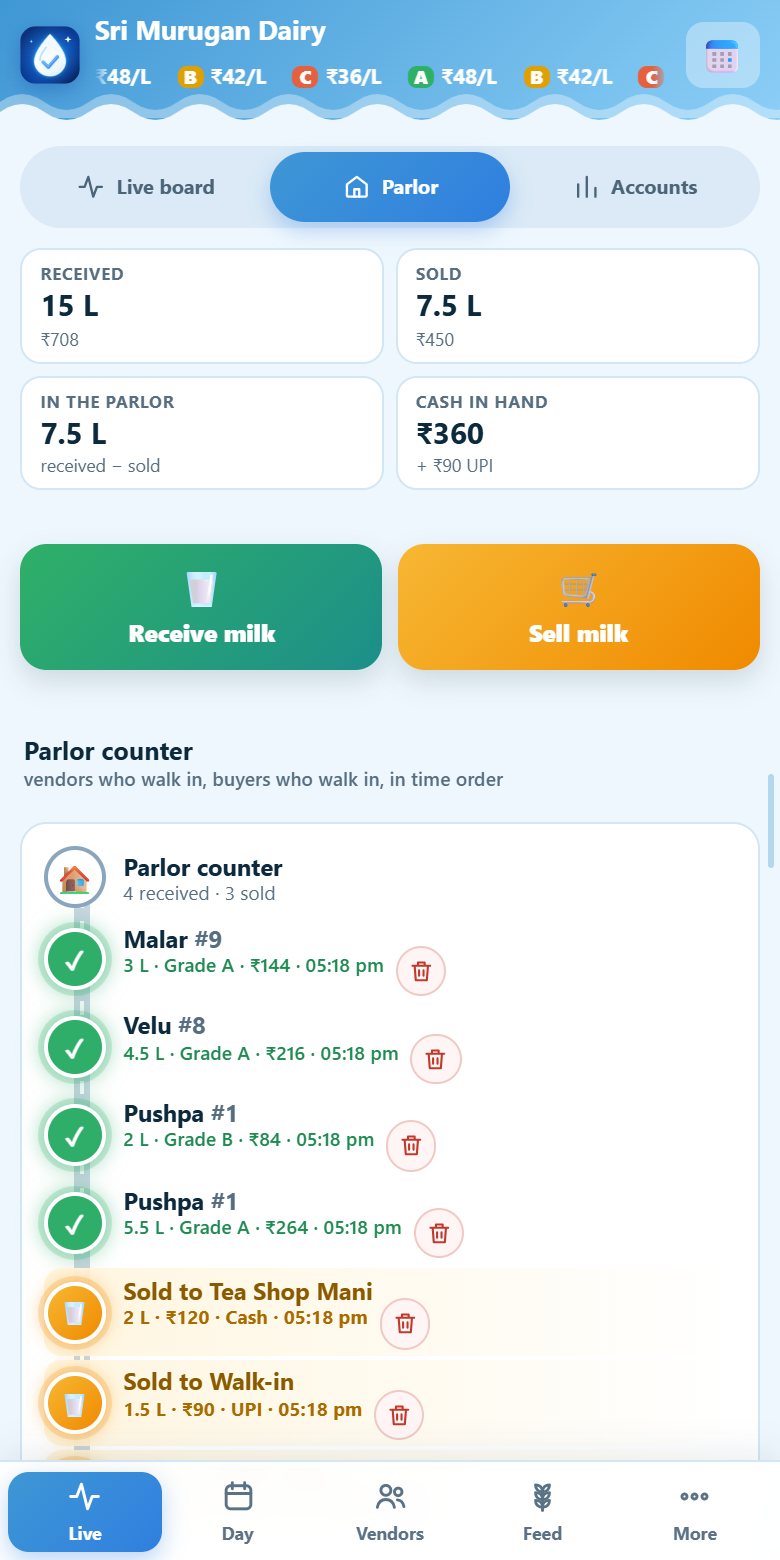
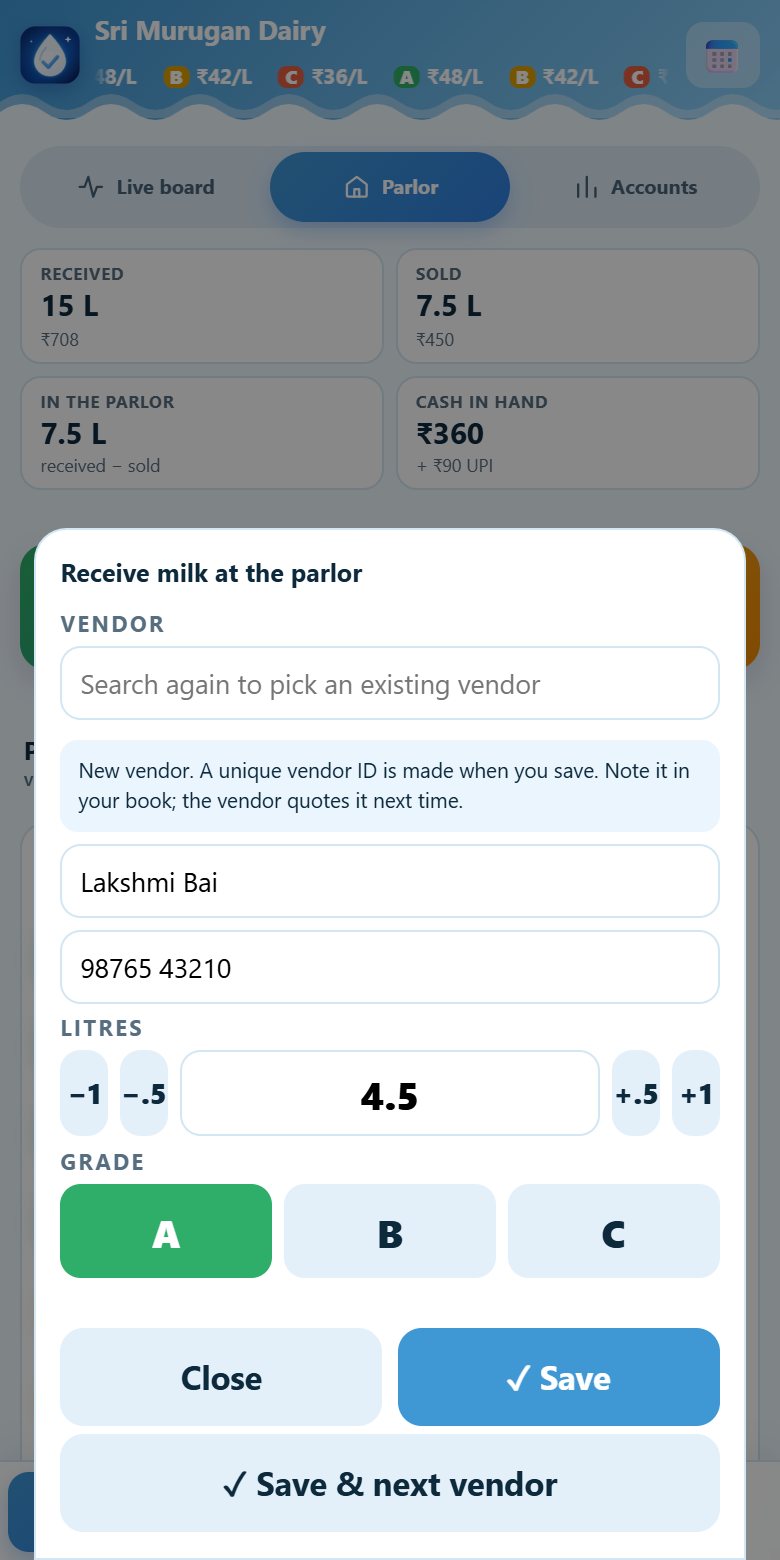
The parlor counter: received, sold, litres in the parlor, cash in hand, and a timeline of vendors and buyers
Receiving milk from a new walk-in vendor: name, phone, litres and grade; a unique vendor ID is made on save

Receive milk from walk-in vendors and sell milk to walk-in buyers, on one timeline.

Every shift · Leave, backup and wages

Leave is unpaid. A backup is paid. Wages are exact.

Ravi calls in sick. Selvi logs the leave in seconds and assigns a backup collector for those shifts. Litrio pays each person only for the shifts actually worked, at the wage of that day.

Every collector has their own colour on every screen, so who is who is clear at a glance. In Wages, blue days are worked and amber days are leave.
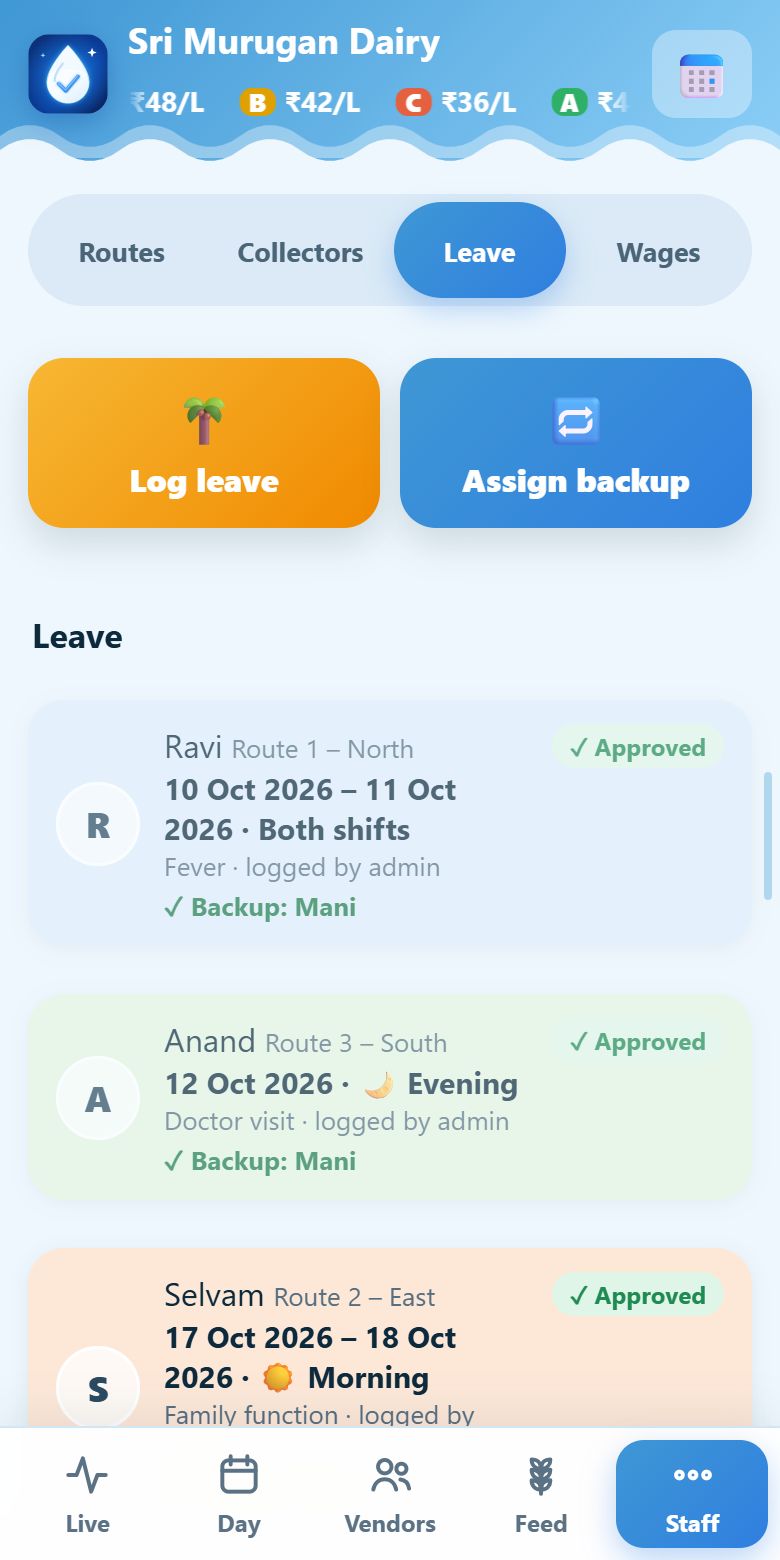
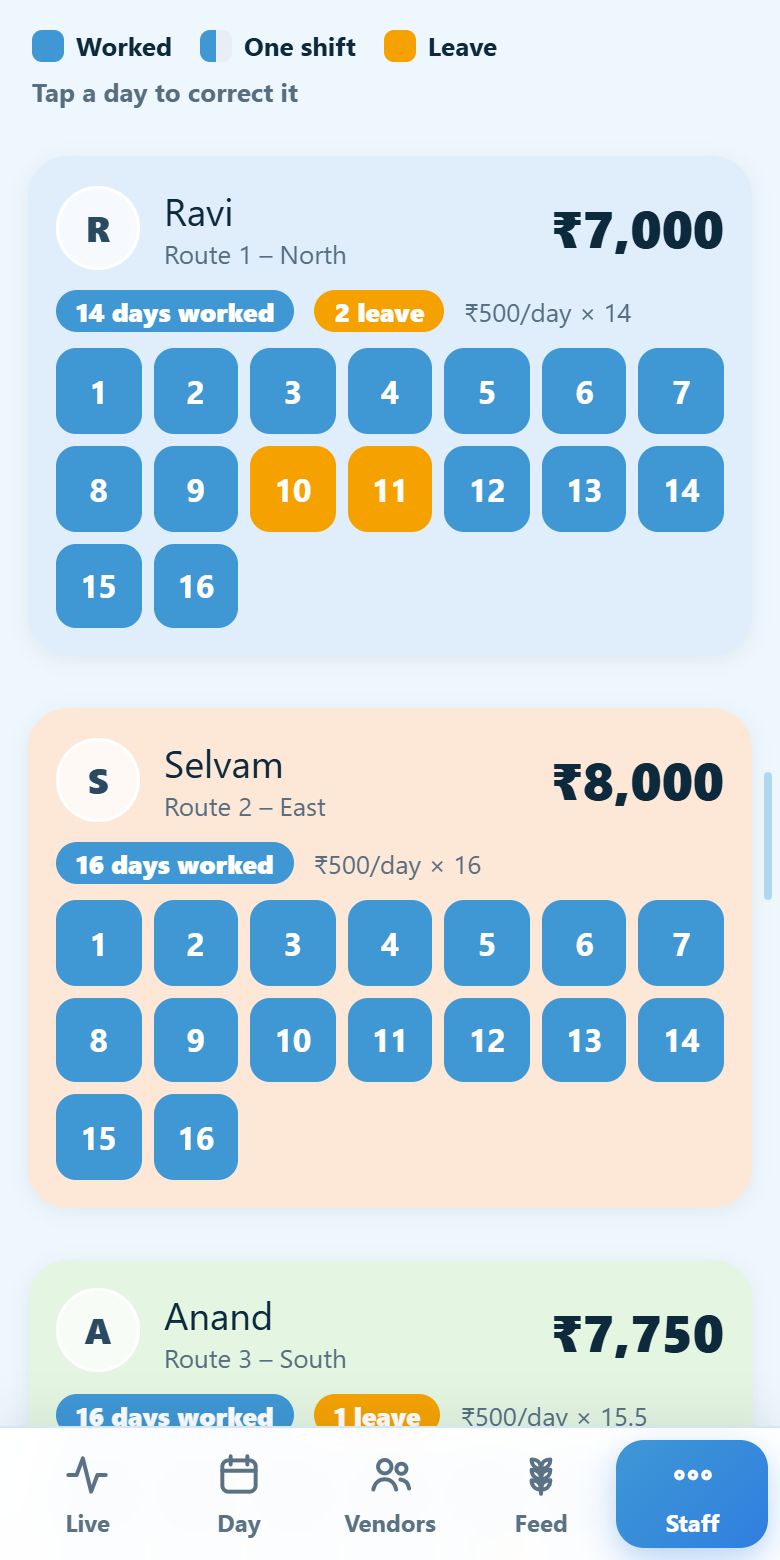
Leave and backup: Log leave and Assign backup, each leave with its backup collector
Wages: a colour per collector, worked days in blue, leave days in amber

Leave and backup on the left, wages by collector on the right.

Any day · Feed

Feed with a buy rate and a sell rate

Selvi adds each feed with the rate she pays her supplier and the rate she charges vendors. The difference is her profit on every bag, shown right in the inventory.

She gives feed on credit from the Distribute screen: pick the route, search the vendor, enter the bags, add a discount if she likes, and confirm. The amount goes on that vendor's account, and low-stock alerts tell her when to reorder.
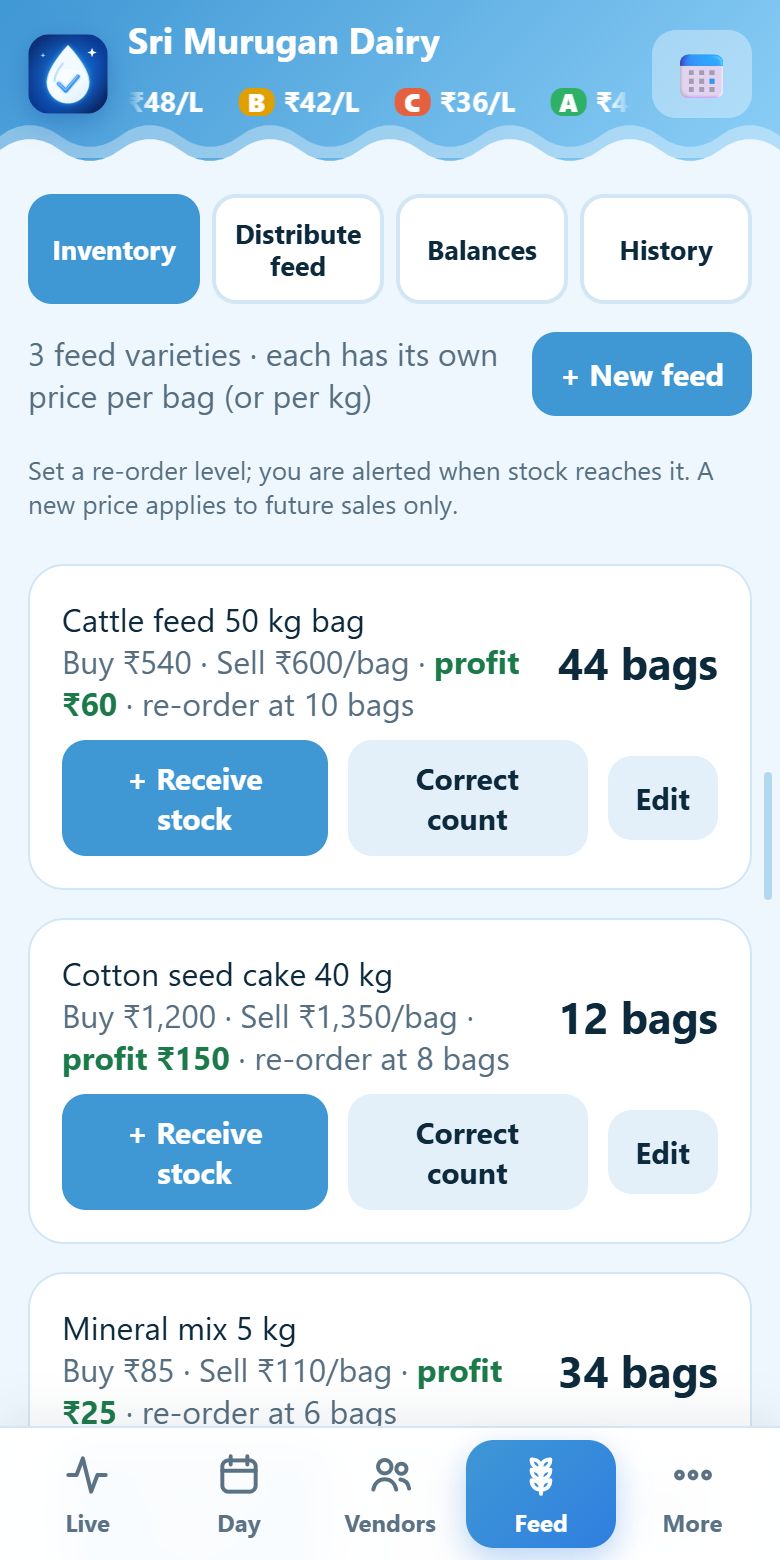
The feed inventory: buy rate, sell rate, profit per bag and stock

Inventory with buy rate, sell rate and profit per bag.

Settlement day · Weekly or monthly

Pay each vendor once, correctly

Selvi picks a weekly (Saturday evening) or monthly (last day) settlement. When a vendor needs money in between, she gives an advance in one tap, from the same screen.

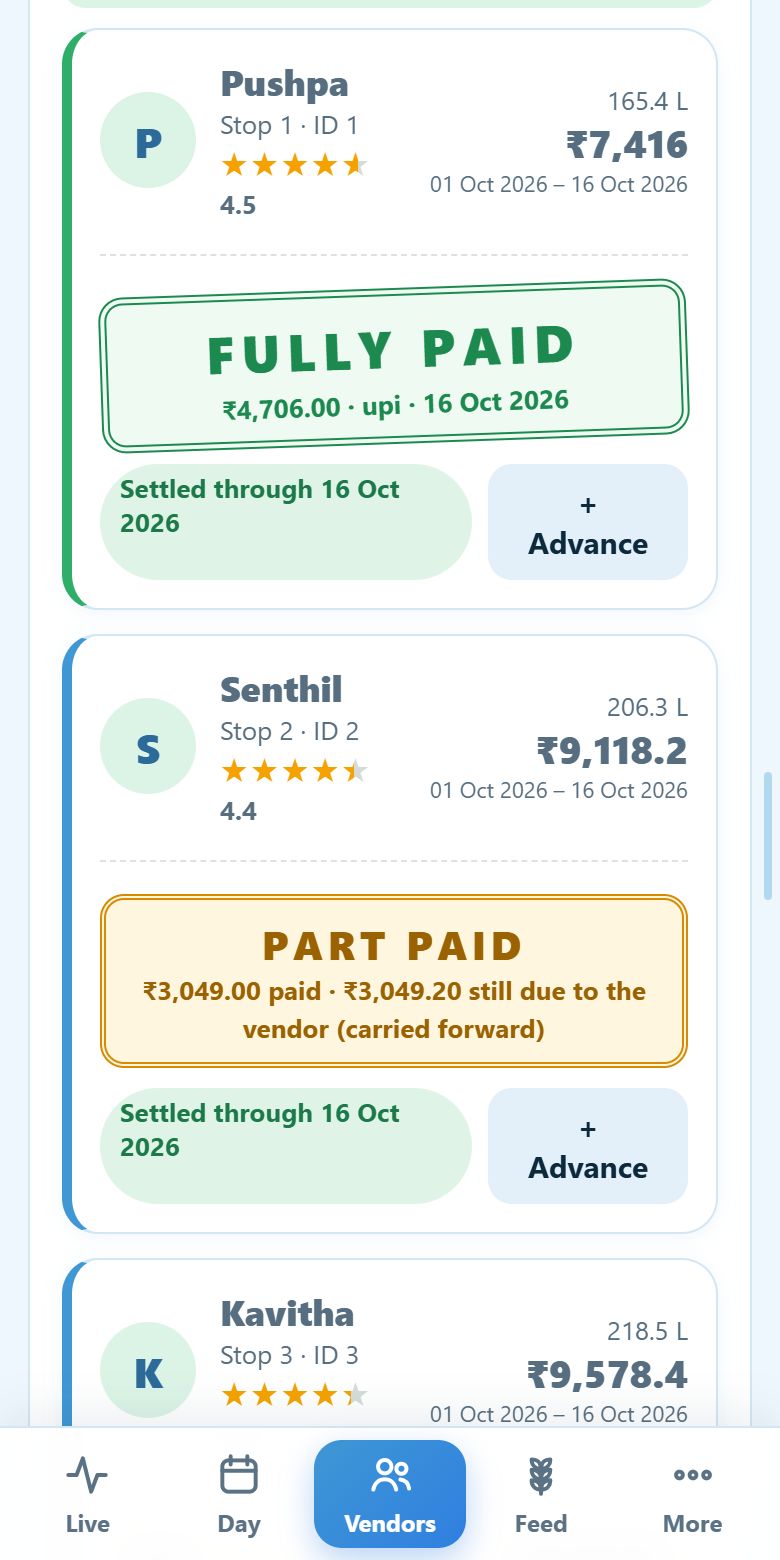
Each payout reads like a small invoice: milk, less advance, less feed, equals what to pay. If nothing is due, a big DO NOT PAY stamp stops a mistaken payment. Once paid in full, a green FULLY PAID stamp appears, and a part payment carries the rest forward.
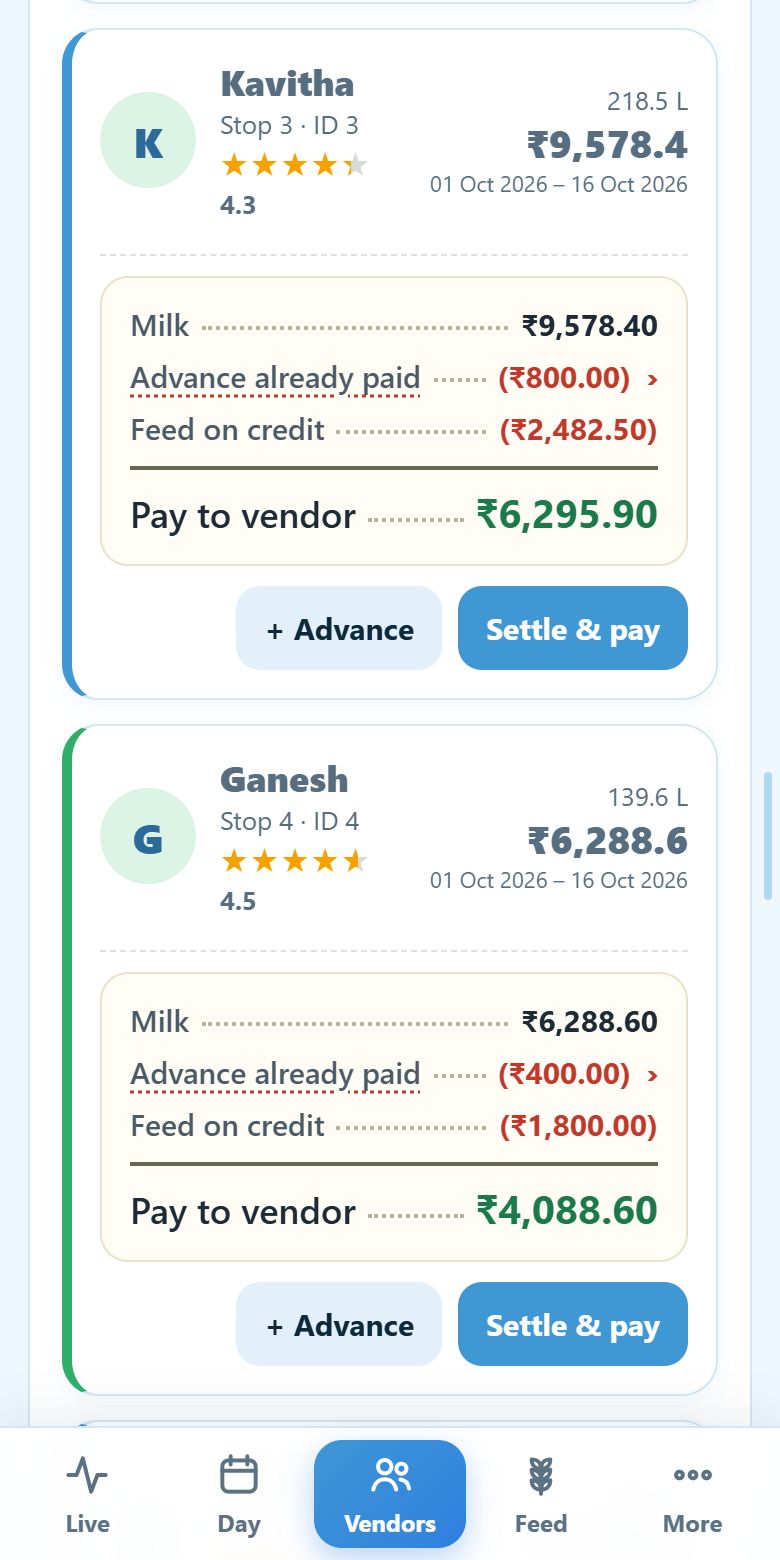
A vendor payout shown as an invoice with advance and feed deducted
A green FULLY PAID stamp and an amber PART PAID stamp

The payout bill on the left, and the paid stamps on the right.

Any day · Profit

Know what the parlor really earned

Litrio keeps three rates side by side: what Selvi pays vendors by grade, one rate for local buyers, and what the dairy pays her by grade. So every litre is valued the right way.

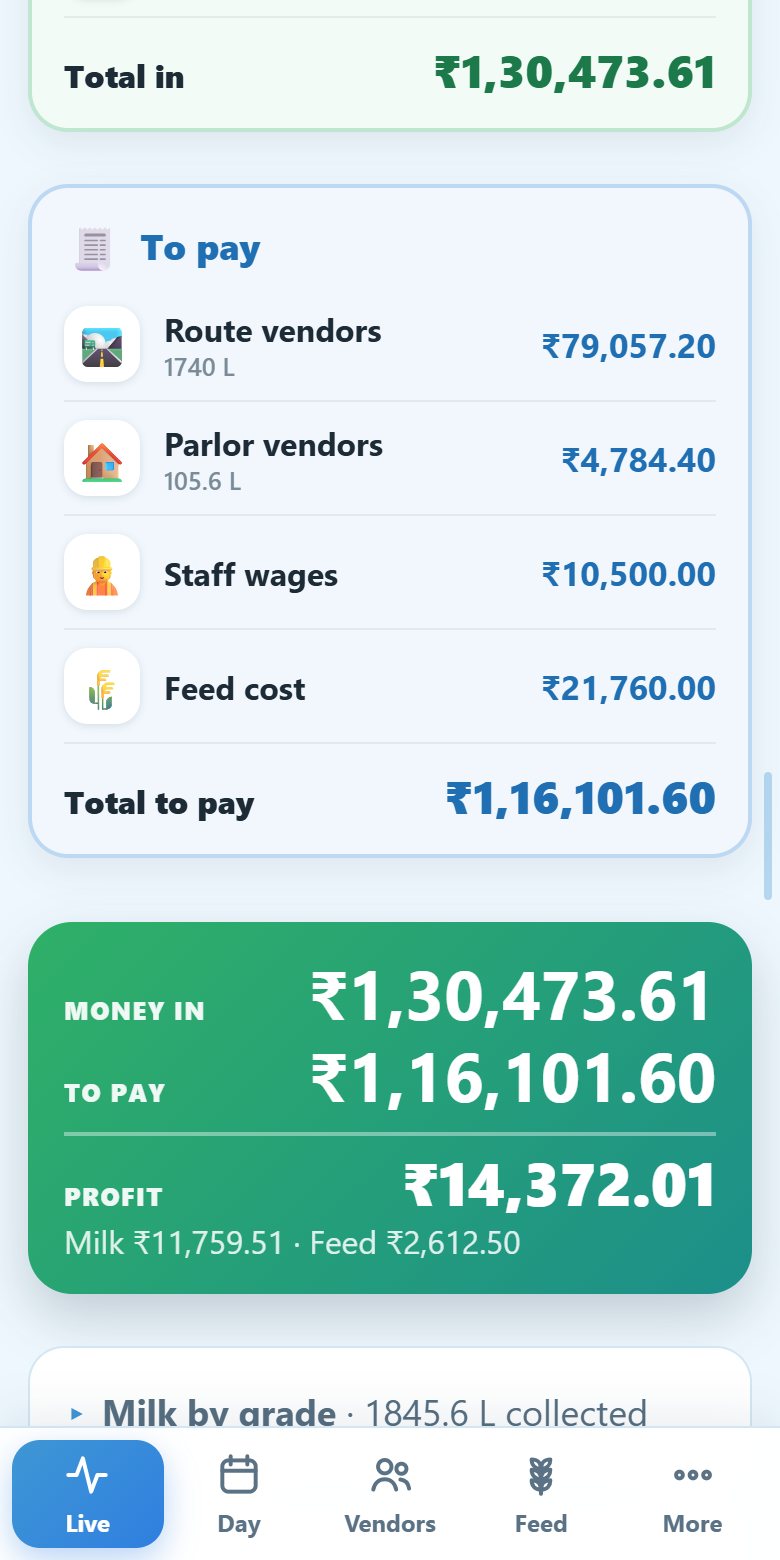
On the Accounts screen she picks a day, a week or a month and sees three simple cards: Money in from the dairy, the parlor, the road and feed; To pay for vendors, staff wages and feed cost; and the Profit left over.
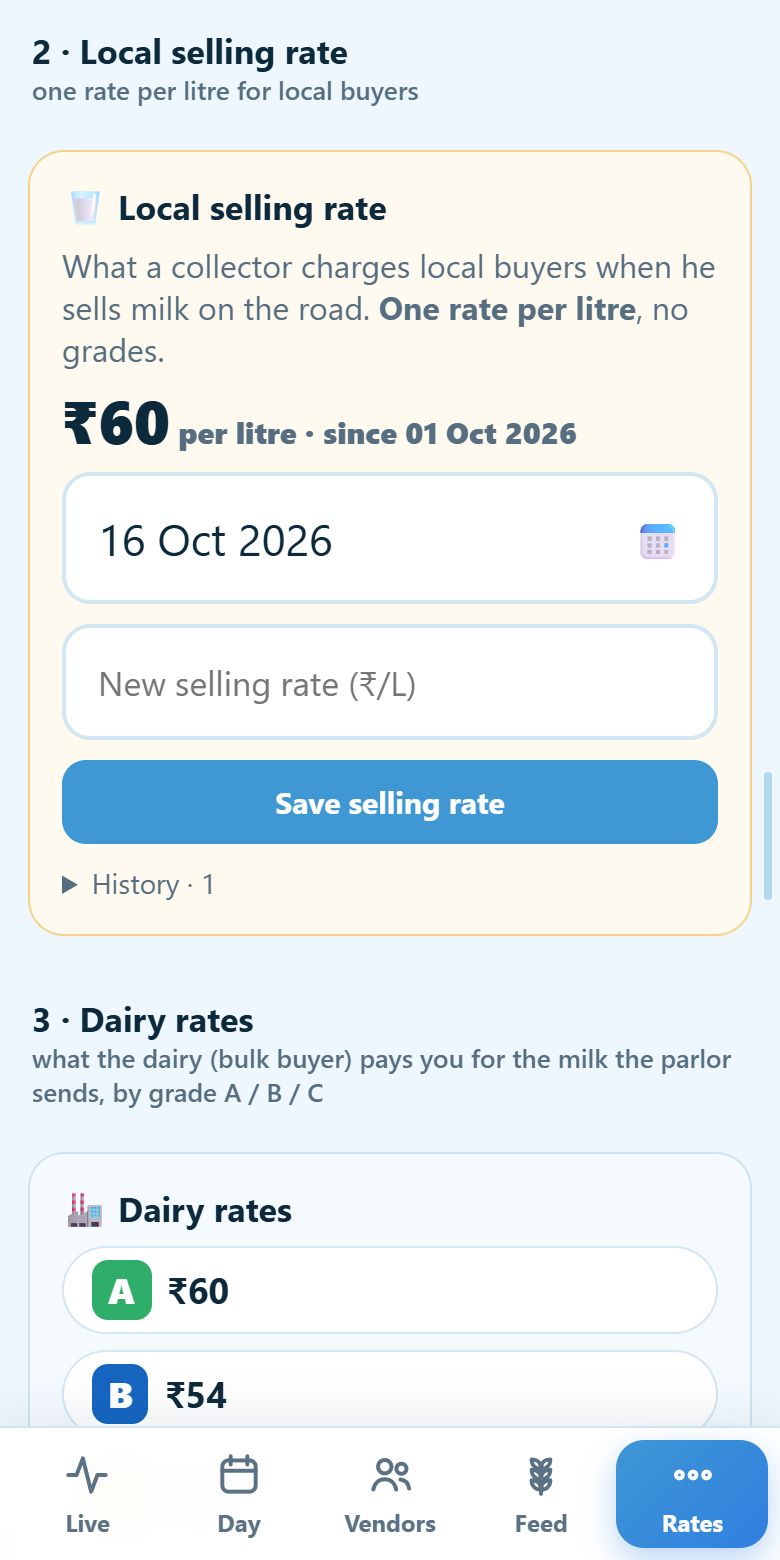
The Rates screen: vendor rates, one local selling rate and dairy rates
The Accounts screen: Money in, To pay and Profit as three simple cards

Three rates on the left, and the profit they produce on the right.

These are real Litrio screens, filled with sample data.

How it works

From the first stop to the last payout

1

Set up

Routes, vendors in visiting order, collectors, and your three rates.

2

Leave

The milkman taps Leave parlor. Attendance and route timing start.

3

Speak

Vendor, litres, grade. Check the big card. Tap OK. Selling? Tap Sell milk.

4

Watch

Every stop turns green on the live board, even from home.

5

Settle

Pay vendors with advances and feed netted off. See your profit.

Everything included

One system for the whole parlor

🎙️

Voice entry Available

“One litre 300 ml, A grade” becomes 1.3 L, grade A. Understands litres and millilitres, number words, and “A grade milk”.

📶

Works offline Available

Entries are saved on the phone and sync when signal returns. One bad entry never blocks the rest.

🛣️

Live road board Available

Every vendor is a stop. Green, red, next-stop pulse, the time between stops, and every milk sale shown on the road where it happened.

🥛

Sell milk on the road Available

Collectors sell to any buyer by voice: a name and the litres. One fixed local rate, and the balance to hand over is worked out for you.

🏠

Parlor counter Available

Receive milk from vendors who walk in, even new ones who get a unique ID on the spot, and sell milk to buyers who walk in. Vendors are paid like any collection and the sales go into your accounts.

🏭

Three rates Available

Vendor rates by grade, one rate for local buyers, and dairy rates by grade for the milk you send in bulk, all with effective dates.

📒

Profit & accounts Available

Pick a day, a week or a month: money in, money to pay, and the profit, in three simple cards.

💸

Advances & settlement Available

Give advances any day. Settle weekly or monthly with feed and advances netted off. DO NOT PAY and FULLY PAID stamps prevent mistakes, and every payment is kept in a history.

🌾

Feed with buy & sell rates Available

Keep a feed inventory, give feed to vendors on credit by searching route and name, and see your profit on every bag.

🌴

Leave & backup Available

Log leave on a collector's behalf or let them request it. Assign a backup for a shift or a week.

💰

Per-shift wages Available

Automatic attendance. Every collector has their own colour; worked days show blue and leave days amber. A shift worked pays half the daily wage.

📱

Made for the phone Available

The admin screens are built for a phone: a bottom menu, a rolling rate ticker and big buttons, with the same look on the desktop.

📈

Rate history Available

New rates apply from a date. Earlier entries are never re-priced behind your back.

⭐

Vendors & payouts Available

Vendor cards by route, star ratings from milk quality, and payouts for any date range, worked out exactly from the grade and rate of each day.

🛟

Stuck-phone recovery Available

Refresh a collector's app, close a hung trip, or enter a stop yourself, without losing data.

🔒

Close the books Available

Freeze a paid period. Every sensitive action is written to an activity log.

💾

Backups & export Available

Nightly backups, plus download all your data any time, even if your account is paused.

📥

Import your vendors Available

Upload your vendors with their route and stop number from Excel, CSV or a plain text file, using a ready-made template. Check the preview, then confirm.

🧾

GST invoices as PDF Available

A proper month-end tax invoice with CGST and SGST or IGST, with the day-wise usage attached.

🗣️

Your language Available

Tamil, Hindi, Telugu, Kannada and Malayalam. Pick one second language for your parlor; everyone switches between English and it for themselves. Voice understands it too.

🙈

Prices stay private Available

Collectors enter the vendor, litres and grade only. They never see a price; the parlor admin does, worked out exactly by the server.

👨‍🌾

Vendor view Coming soon

Each vendor will see their own litres, grades and money by day, week or month.

🛡️

Extra safe-collect checks Coming soon

Warnings for an unusual quantity or a duplicate entry before it is saved.

Pricing

Pay only for the vendors you serve

₹0.25per vendor per day + GST
  • First 30 days free, every feature
  • Prepaid wallet: add funds with UPI, cards or net banking (Razorpay)
  • Unlimited collectors, unlimited admin logins
  • GST invoice (PDF) every month
  • No set-up fee, no contract, stop any time
Start 30 days free

The free trial includes up to 5 routes and 50 vendors per route. Nothing is charged unless you add funds.

Your estimate
₹15.00 per day
Per month (30 days)₹450
GST (18%)₹81
Total per month₹531
First 30 days₹0

A day's vendor count is the average of the vendors served in the morning and in the evening, rounded to the nearest whole number. Charges build up through the month and are deducted from your wallet at month end. Your wallet must cover one day's charge for the day to start.

Questions

Good to know

Do my collectors need to install an app?

No app store needed. Litrio is a web app: they open the link in Chrome on any Android phone and tap “Add to Home screen”. It then opens like an app and works without signal.

Does voice work without internet?

Voice recognition in Chrome needs an internet connection, because Chrome's speech service listens and converts it to text. Without signal, collectors use big on-screen buttons to enter the same details, and everything syncs later. Your entries are never lost either way.

Do collectors see the price of the milk?

No. Collectors only enter the vendor, litres and grade. Prices are worked out on the server from the grade and the rate of that day, and only the parlor admin sees them.

What if the voice hears something wrong?

Nothing is saved until the collector taps OK on the confirm card, which shows the vendor, litres (with the millilitre breakdown) and grade in large type. They can correct any of it with big buttons first. Prices are never shown to collectors.

What do I need to get started?

A mobile number to receive a verification code, and your vendor list. Registration takes a few minutes, and you can add vendors and routes as you go.

How is the daily fee calculated?

₹0.25 per vendor per day plus 18% GST. We count the vendors you collected from in the morning and in the evening, average the two and round to the nearest whole number. For 45 vendors that is ₹11.25 a day before GST.

What happens after the 30 days?

You add funds to your prepaid wallet. A day can start only when the wallet covers one day's charge. If it does not, new collection pauses; you can still view and download your data and add funds. After 7 days without funds the account locks until you add funds. Your data is never deleted for non-payment.

Can my collectors sell milk too?

Yes. Collecting stays the default. To sell on the road, the collector taps Sell milk, says the buyer's name and the litres, and confirms. Buyers need no registration, and there is one fixed selling rate whatever the grade. The litres sold are taken off what he collected, so the balance to hand over at the parlor is always clear.

Can I collect and sell milk at the parlor myself?

Yes. Open Live, then Parlor. Receive milk from vendors who walk in and sell milk to buyers who walk in, as many as you like. A new vendor can be added on the spot and gets a unique ID to note down or quote next time. The vendors are paid for that milk like any other collection, and it shows in your accounts next to the routes.

How do advances and settlement work?

A vendor can take an advance on any day; it is recorded and deducted automatically at the next settlement. You choose a weekly (Saturday evening) or monthly (last day) settlement. At settlement Litrio nets the milk, advances, feed and any earlier dues, shows exactly what to pay, and carries forward anything left unpaid.

How do I see my profit?

Open Live, then Accounts, and pick a day, a week, a month or any range from the Quick range list. You see three cards: Money in (dairy, parlor, road and feed sales), To pay (vendors, staff wages and feed cost) and your Profit. Set your selling rate and dairy rates on the Rates screen, and each feed's buy rate in the Feed inventory.

Can vendors see their own entries?

A vendor view with daily, weekly and monthly amounts is coming soon. For now, the parlor admin has payouts for any date range on the Payouts screen.

What if a collector is on leave?

Leave is unpaid. You can log it on their behalf, or they can request it from their phone. Assign a backup collector for the route, and each person is paid only for the shifts they actually work.

Which languages are supported?

English plus Tamil, Hindi, Telugu, Kannada and Malayalam. Each parlor picks one second language, and the admin, collectors and vendors each choose English or that language for themselves, at the same time.

Is my data safe?

Each parlor's data is kept in its own separate database. PINs are stored hashed, sessions expire, every sensitive action is logged, and nightly backups are kept. See our Privacy Policy for retention: detailed entries are kept 24 months, monthly summaries for 7 years.

Can I get a refund?

Yes, within the limits in our Refund & Cancellation Policy. There is no lock-in, and you can close your account at any time.

Ready to retire the notebook?

Set up in minutes. 30 days free, every feature, no card.

Start free trial